Awesome Web Typography @SXSW
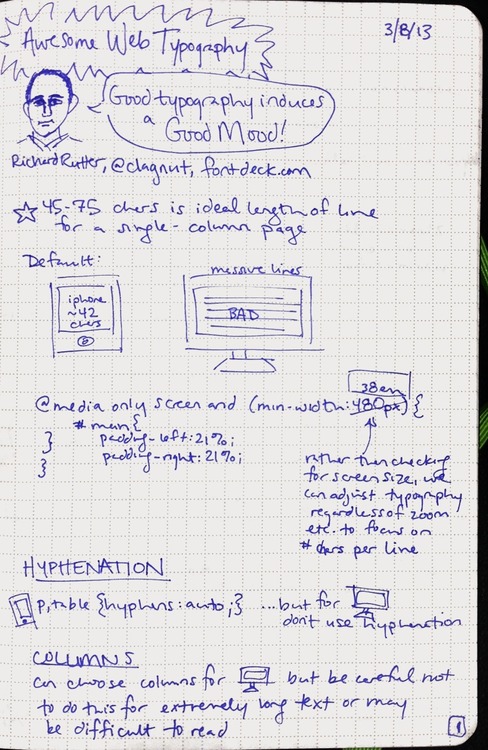
Richard Rutter of fontdeck.com taught a class about web typography at SXSW'13. He showed us some great examples of when and how to tweak your typography with HTML and CSS.
A few things I learned:
- adjusting auto-hyphenation
- responsive web design - adjusting for line length, line breaks, etc. when on different sized screens
- how to handle multiple columns
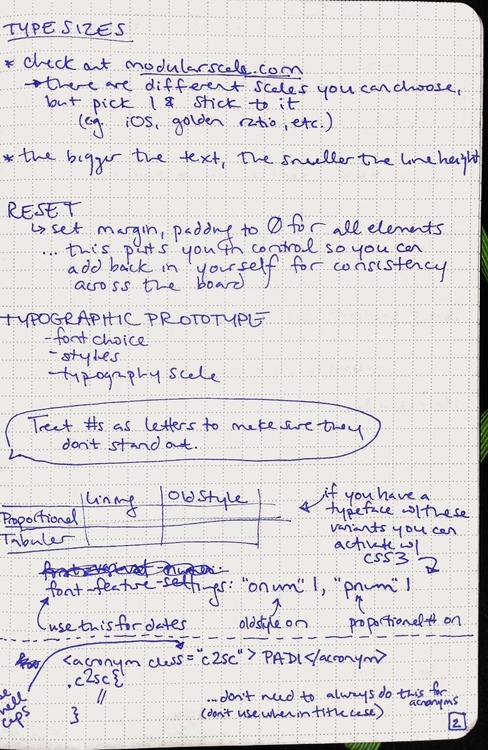
- proportional/tabular/lining/old style
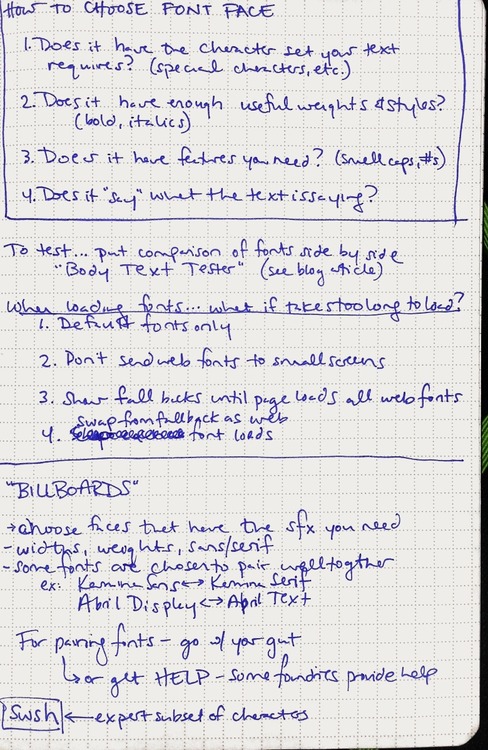
- how to choose font faces for the web
- options for loading custom fonts so that the experience is good even on slow internet connections
My notes:
wordmark.it
Use your HTML5-compatible web browser to preview the fonts on your computer. It’s like FastFontPreview, but more awesome because there’s nothing to install.
From its creator:
Wordmark.it detects fonts with the aid of a flash script by Marko Dugonjić. It also uses Remy Sharp's font detection script.
What the Font?
A nifty tool for identifying fonts based on images: What the Font
Simply upload an image, verify characters, and view the results. I was very impressed by how useful and usable the tool is–I was able to identify a (very close match of) a font in less time than it took to find the image on my computer.

The division between computer & user “work” is very well managed– the results page shows fonts which are somewhat similar to the user-submitted font. The user can then look through all of the results and choose which one is the best match. A really great detail: a copy of the image that you submitted remains in the center of the screen as you scroll up and down the list for quick user comparison. Links to asking experts for help or purchasing fonts are worked in seamlessly. Overall, I was very impressed by both the tool and site design. (Much improved from their old site– view if you dare)
I haven’t checked how well this tool works with more decorative fonts, but I’m sure I’ll be back soon.
P.S. Just noticed they have an iPhone app– bonus usefulness points.